Locating your Drupal version number
After installing your Drupal into your hosting account and begin working with it, you may need to recall your version number at some point. Knowing the version number can be important when troubleshooting addons or working with bug fixes, etc. Below are instructions for locating your version number from the Drupal back office.
How to find your Drupal version number
- Log into your Drupal administration panel.
- Now that you are in the admin interface, use the top menu bar and click on the Reports option.
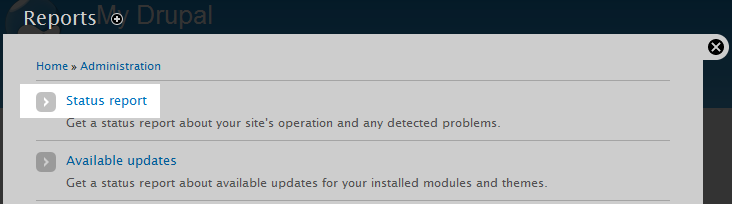 After arriving on the Reports page, find the Status report link anc click on it.
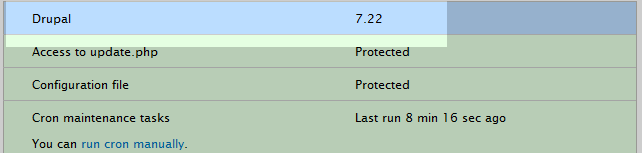 This leads you to a configuration screen with many settings displayed. At the very top is a setting named Drupal. Look to the right hand side to see your current version number.
Did you find this article helpful?
Tweet
Next »
How do I Optimize Drupal?
Category
Drupal
Help Center Login
Related Questions
Here are a few questions related to this article that our customers have asked:
Ooops! It looks like there are no questions about this page.
Would you like to ask a question about this page? If so, click the button below!

We value your feedback!
There is a step or detail missing from the instructions.
The information is incorrect or out-of-date.
It does not resolve the question/problem I have.
new! - Enter your name and email address above and we will post your feedback in the comments on this page!