How to Assign the VirtueMart Component to a Menu Item
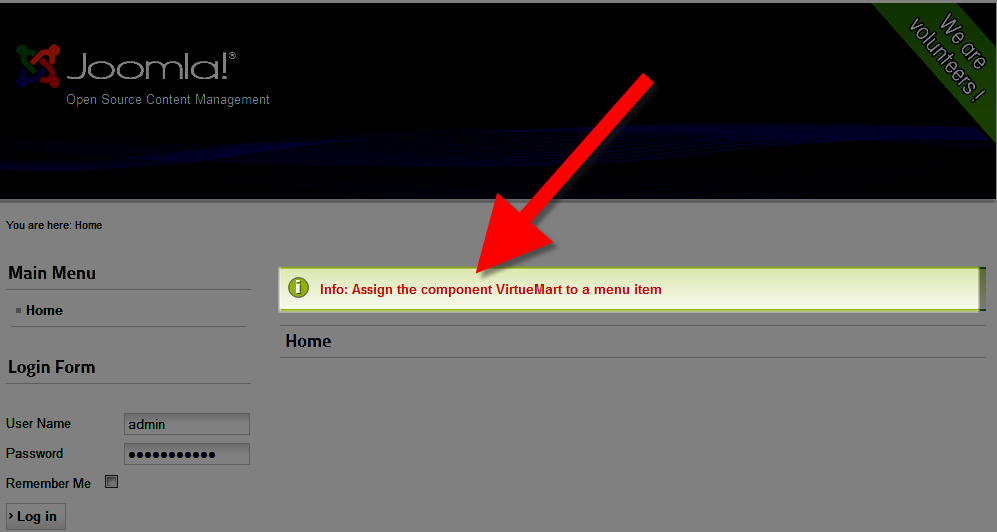 After installing the VirtueMart component in your Joomla! website, you may see an error that states "Info: Assign the component VirtueMart to a menu item."
In this tutorial I will guide you in assigning your VirtueMart component to a menu item, so that this error will no longer display on your E-commerce website.
Assigning the VirtueMart Component to a Menu Item:
- Login to your Joomla Admin Section.
- Roll your mouse over Menus option, then Main Menu, and click +Add New Menu Item.
You will be presented with a some blank fields.
Option Description Menu Item Type Click the Select button, under the Virtuemart header choose the type of menu you want to create, in my test I want a link to the main online store page, so I selected Front Page. Menu Title The text you enter here will display as the name of the menu you are creating. In my tests I entered Store in this field. Alias Enter specific words you would like displayed in the URL. If you leave this blank Note You can put a note in this field. Link Enter a link if you want to use one here. Status Choose from Published Unpublished and Trashed. Access Select from Public, Registered, Special. Menu Location Select where you want the menu displayed from the drop-down menu. Parent Item If you want this to display as a main menu, choose menu item root. To be a sub-menu under another menu, select the menu from the drop-down list. Ordering Joomla! will notify you "Ordering will be available after saving." Target Window To open this menu in a new window, select New window with navigation, or new window without navigation. To open in the same window select Parent. Default Page Choose Yes or No, if yes is selected, this new menu will appear as your main website page. Language From the drop-down menu select your language. Template Style From the drop-down menu select a template style.
There are more options over to the right, if you roll your mouse over them Joomla will provide more information. After making your selections click the Save, or Save & Close button. Now when you visit your website, you will see the link to your VirtueMart store in the menu, and the error message will no longer display.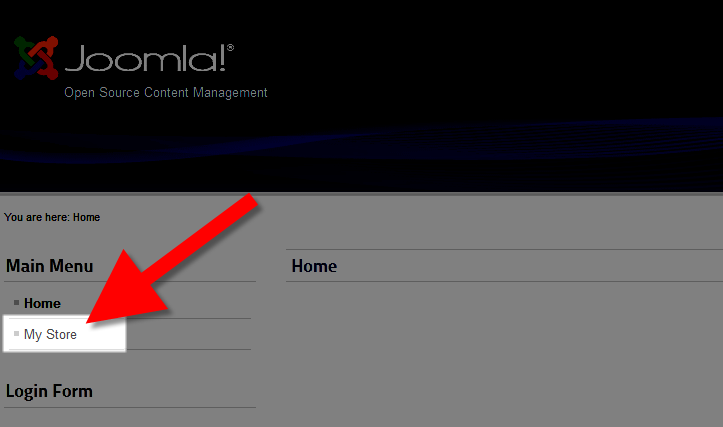
Congratulations, now you know how to assign a VirtueMart component to a menu item, so that the "Info: Assign the component VirtueMart to a menu item" error will no longer display on your E-commerce website.
Did you find this article helpful?
Tweet
Next »
How to Update VirtueMart
Category
VirtueMart Installation and Login
Comments

n/a Points
|
2014-04-29 3:42 pm
Hi, I want to show the puchased items from virtuemart to show in my account menu bar. How can be it possible? Please help me on this. |

Staff 2,342 Points
|
2014-04-29 4:03 pm
To clarify, are you trying to show items that have already been purchased by a logged in user or items that are currently in their cart?
|
|
Staff 2,342 Points
|
2014-04-29 4:07 pm
Could you clarify which of these two things you are trying to accomplish?
|
|
n/a Points
|
2014-04-29 4:10 pm
items that have already been purchased by a logged in user |
|
Staff 2,342 Points
|
2014-04-29 4:47 pm
Unfortunately, I am unaware of a solution in existence to do this, however, there may be a Joomla developer out there that could custom code this for you.
|
Help Center Login
VirtueMart Installation and Login
| 1. | How to Install Virtuemart in Joomla! |
| 2. | No Shop Currency defined! - VirtueMart Error |
| 3. | How to Assign the VirtueMart Component to a Menu Item |
| 4. | How to Update VirtueMart |
Related Questions
Here are a few questions related to this article that our customers have asked:
Ooops! It looks like there are no questions about this page.
Would you like to ask a question about this page? If so, click the button below!

We value your feedback!
There is a step or detail missing from the instructions.
The information is incorrect or out-of-date.
It does not resolve the question/problem I have.
new! - Enter your name and email address above and we will post your feedback in the comments on this page!