PrestaShop: An error occurred during deletion
The full installation of PrestaShop includes several demo products and other data. When deleting the demo products, you may see the following error. This tutorial will walk you through how to resolve this "error occurred during deletion" issue:

At first glance, this is a vague error that really doesn't specify what issue caused the error. Fortunately, with a little research, we were able to find a solution.
The demo data included in the full PrestaShop installation also contains a sample order. We will need to cancel that order before we can delete any products that are tied to that order.
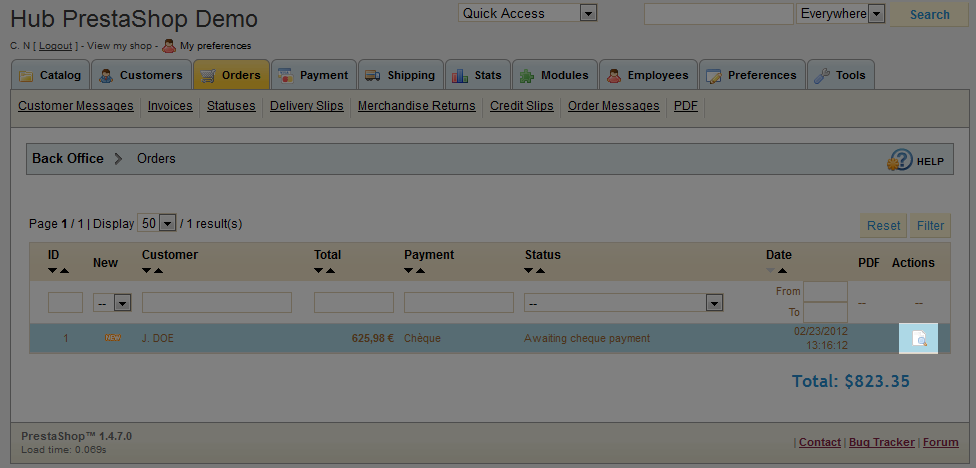
- In your PrestaShop back office, click on the Orders tab.

- Click the view icon for the "J. Doe order."
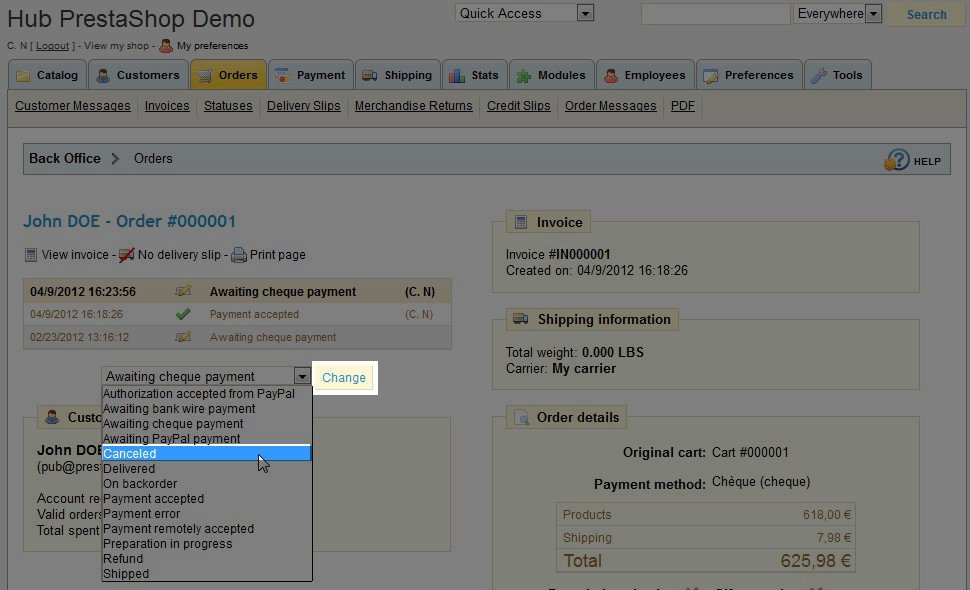
- Choose Canceled from the order status drop down menu and click the Change button.
Now we can return to the Catalog tab in our PrestaShop back office and delete the remaining demo products.
Did you find this article helpful?
Tweet
Help Center Login
Managing Products and Categories in PrestaShop
Related Questions
Here are a few questions related to this article that our customers have asked:
Ooops! It looks like there are no questions about this page.
Would you like to ask a question about this page? If so, click the button below!

We value your feedback!
There is a step or detail missing from the instructions.
The information is incorrect or out-of-date.
It does not resolve the question/problem I have.
new! - Enter your name and email address above and we will post your feedback in the comments on this page!