Troubleshooting Plugins in WordPress
Plugins allow you to add functionality that you would not normally see from a normal WordPress installation. However, this ability to add WordPress functions can also lead to problems and in some cases no access to the WordPress admin dashboard where you would normally disable or delete the plugin. Fortunately, you can still troubleshoot Wordpress without access to the dashboard. The following articles shows how to isolate the problem causing Wordpress plugin by simply renaming the folders.
Resolving WordPress plug-in Issues without Access to the WordPress Admin
 Rename the plugins folder to something like "plugins-old" and then add a new folder named "plug-ins". This folder is in the wp-contents folder of your WordPress installation. You will need to use the cPanel File Manager or a FTP client in order to rename the plugins folder. This will disable ALL of the plugins.
-
Re-load your WordPress page. If your Wordpress page loads properly, then the problem is most likely a loaded plugin.
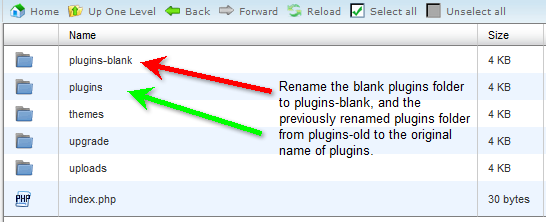 Rename your new plugins folder to something like "plugins-blank", then go back and rename your old plugins folder back to "plugins."
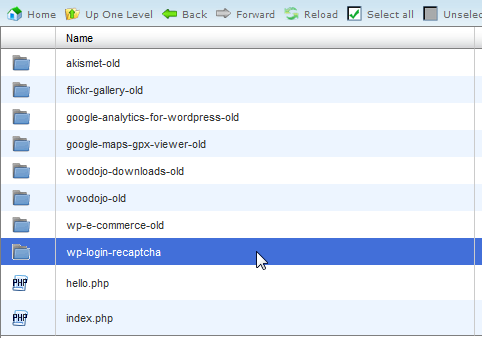 Next, rename all of your plugins folders except one. And then re-load the page. You could also rename each plugin folder one-by-one and see if it helps to your page reloads.
- If the page gives you an error, then the problem is that plugin (If you rename them one-by-one, then you would looking to see if your WordPress page loads. If it loads, then the problem was the plugin folder that you renamed). If the page does NOT give you the error, then move to the NEXT plugin and enable it and then re-load the page. Continue this until you find the plugin that's causing the problem.
When you identified the plugin causing the problem, you will need to make the decision to re-load, update, or delete the plugin. Technical Support is not provided for third party WordPress plug-ins due to the custom coding needed for their creation. And since WordPress plugins number in the thousands, the best solution for technical assistance is to contact the developer of that plugin. This information can often be found on the WordPress.org Plugins page. At this point, since you have access to your Wordpress Administrator you can proceed with removing or waiting on the solution from the plugin developer but you can also proceed with your normal WordPress administration and operations.
Did you find this article helpful?
Tweet
Help Center Login
Related Questions
Here are a few questions related to this article that our customers have asked:
Would you like to ask a question about this page? If so, click the button below!

We value your feedback!
There is a step or detail missing from the instructions.
The information is incorrect or out-of-date.
It does not resolve the question/problem I have.
new! - Enter your name and email address above and we will post your feedback in the comments on this page!