How to change the tax class for a product in OpenCart 1.5
Setting the tax class for Opencart 1.5 is based on three options: taxable goods, downloadable products and none. Setting the appropriate tax class is important for each product because it affects the final price for the purchased product. This tutorial will demonstrate how to set the tax class in Prestashop 1.5.
Setting the Tax Class for the Products in OpenCart 1.5
- Login to the Administration Dashboard as an Administrator
- Place your mouse pointer over CATALOG in the menu bar, then when the drop-down menu is shown, click on PRODUCTS. Pick an existing product in the list, or if you have no products use INSERT to add a new product
- Click on thea DATA tab then scroll down until you see the item that says TAX CLASS:

There 2 classes available in the drop-down menu:
-taxable goods
-downloadble products
The third selection (which is the first item that appears in the drop-down menu) is NONE. You would need to select this option when you know that the product will not require a tax to be applied. For further information on taxing your products, reference the tax laws that govern commerce in your region
NOTE: If you intend to apply a tax, you will need to create a GEO-ZONE and then add a tax class and tax rate that can be applied. Go to Using a Geo-zone for tax rates in OpenCart 1.5 for further details. - Select the SAVE in the top right hand corner to save your choice fo this product.
Setting the correct tax class is an essential task that has a prerequisite of setting a specific regional-based zone called a geo-zone with the required tax rate. Once this requirement has been met, the tax class (taxable goods or downloable product) can be assigned to your product and the tax would be correctly calculated. To see the result of having a sales tax set for a downloadble goods and and then assigned to a product, checkout the screenshot below. Note that the view shown is the invoice generated for the customer during checkout: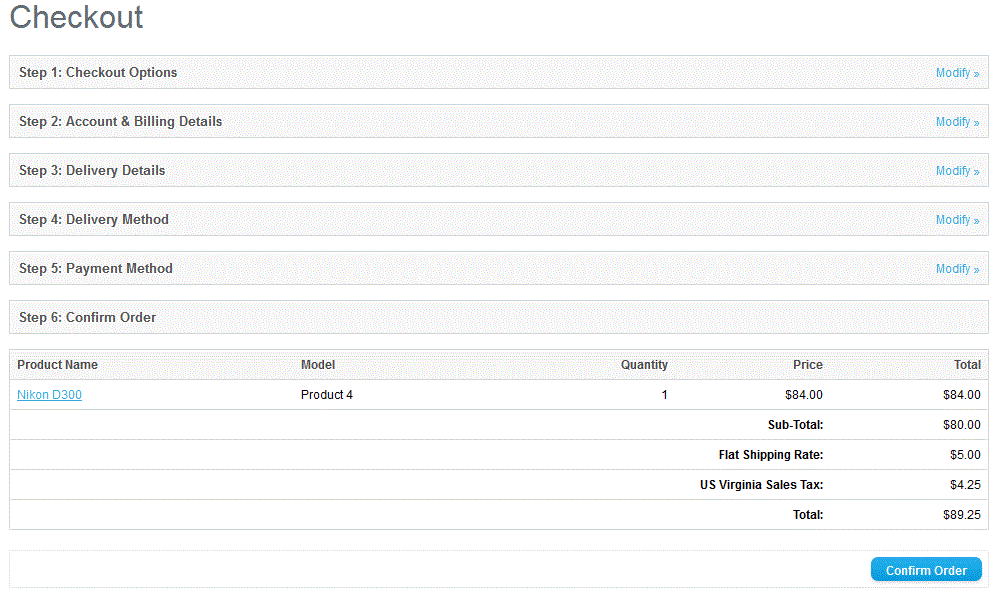
Did you find this article helpful?
Tweet
Category
Shipping and Taxes in OpenCart
Help Center Login
Shipping and Taxes in OpenCart
Related Questions
Here are a few questions related to this article that our customers have asked:
Ooops! It looks like there are no questions about this page.
Would you like to ask a question about this page? If so, click the button below!

We value your feedback!
There is a step or detail missing from the instructions.
The information is incorrect or out-of-date.
It does not resolve the question/problem I have.
new! - Enter your name and email address above and we will post your feedback in the comments on this page!